

#
Webhooks Overview
#
Introduction
Runmerge supports outbound webhooks to notify your systems of key lifecycle events in real-time. This enables you to react to updates, synchronize data, and build event-driven workflows around your Runmerge integrations.
This guide outlines the structure of Runmerge webhook events, including payload format, supported event types, and best practices.
#
Setting Up a Webhook
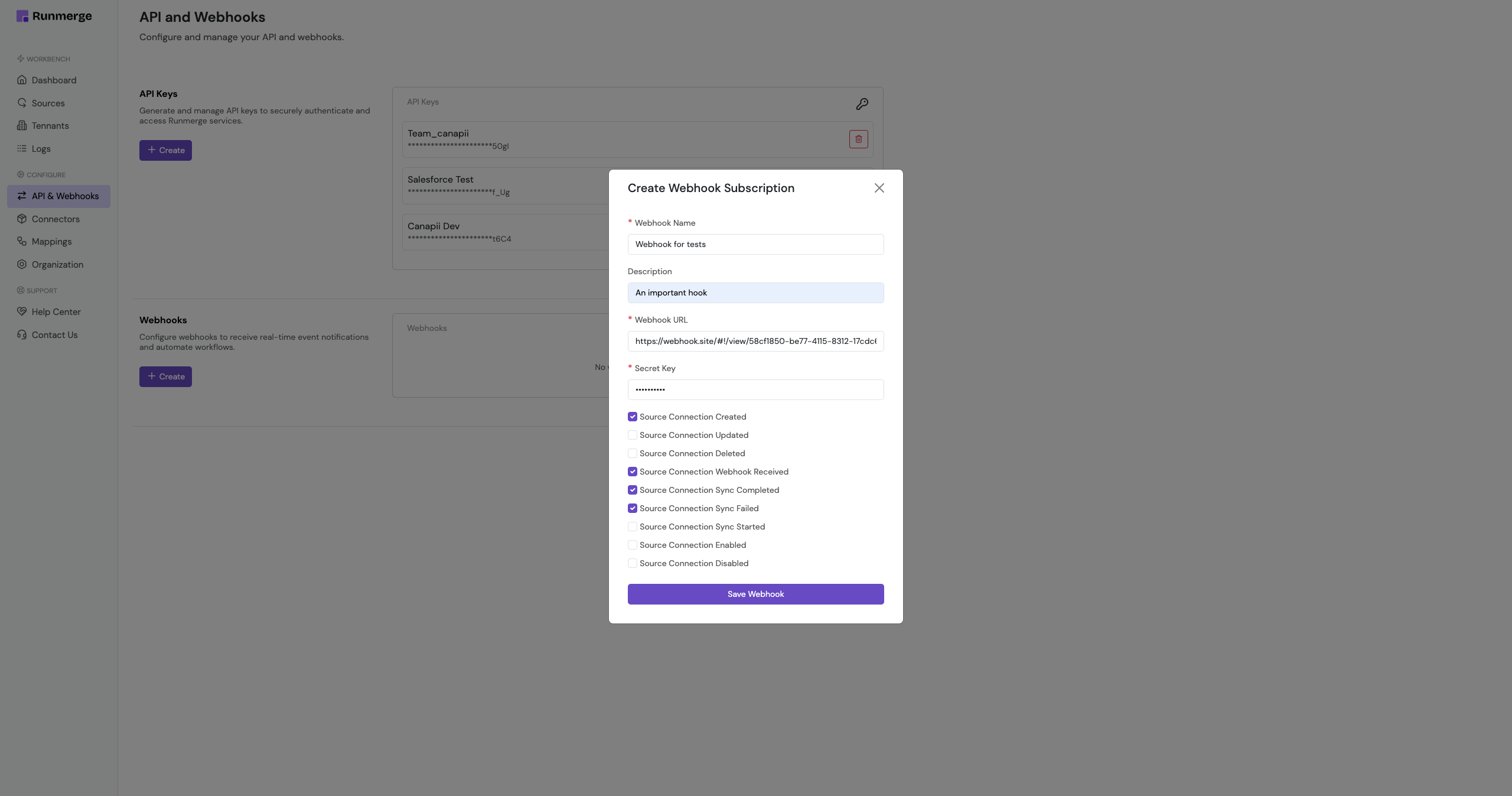
To set up a webhook, go to the Dashboard > click on the API & Webhooks tab > scroll to the Webhooks section and press the Create button.
#
Webhook Delivery
All webhooks are delivered as POST requests to a URL configured for your integration.
#
Headers
Each webhook request includes the following headers:
x-signature: HMAC-SHA256 signature of the payload, used to verify authenticity (Will be generally available from April 25th, 2025).content-type: Alwaysapplication/json.
To verify the signature, compute an HMAC using your webhook secret and compare it with the value of x-signature.
#
Payload Format
Webhooks use a consistent JSON structure. Below is an example payload:
{
    "tenantId": "67da995af086bf563707f36a",
    "eventType": "source_connection_created",
    "organizationId": "67d08cd2252b51c266652920",
    "timestamp": "2025-04-14T09:13:03.681Z",
    "secretKey": "scret_key"
}
#
Payload Fields
#
Supported Events
Runmerge currently supports the following webhook event types:
#
source_connection_created
Triggered when a new source connection is created.
Useful for initializing local systems or triggering onboarding workflows.
#
source_connection_updated
Triggered when a connection’s configuration or metadata is modified.
Use this to keep your local state in sync with changes in Runmerge.
#
source_connection_deleted
Triggered when a connection is removed.
Use this to clean up resources or cached data associated with the connection.
#
source_connection_webhook_received
Fired when Runmerge receives a webhook from a source system on behalf of your connection.
Useful for monitoring source activity or debugging incoming webhooks.
#
source_connection_sync_started
Indicates that a sync job has started for a specific connection.
Can be used to update UI states or track sync progress in your system.
#
source_connection_sync_completed
Triggered when a sync job finishes successfully.
Useful for refreshing views, updating downstream systems, or logging sync events.
#
source_connection_sync_failed
Fired when a sync job fails due to an error (e.g., invalid credentials, network timeout).
Use this to trigger alerts, retries, or administrative notifications.
#
source_connection_enabled
Emitted when a previously disabled connection is re-enabled.
Often used to resume paused workflows or background jobs.
#
source_connection_disabled
Triggered when a connection is disabled due to user action or repeated failures.
Use this to halt any dependent processes or notify admins of integration issues.
#
Security & Retry Logic
#
Signature Verification
We strongly recommend verifying the x-signature header to ensure webhook authenticity.
Use HMAC-SHA256 with your webhook secret and compare the output to the header value.
(For now stick to using secretKey)
#
Retry Policy
If your endpoint returns a non-2xx response or times out, Runmerge will retry the webhook delivery with exponential backoff up to 5 times.
After the retry limit is exceeded, the event will be marked as failed.
#
Best Practices
- Idempotency: Ensure your webhook handlers can handle duplicate deliveries gracefully.
- Logging: Keep logs of all received webhook events and their responses for audit and debugging purposes.
- Verification: Always validate the
x-signatureand/orsecretKeyto confirm authenticity. - Async Processing: Keep response times fast—use queues or background jobs to handle intensive tasks.
Webhooks are a powerful way to build reactive and intelligent systems with Runmerge. When combined with the API, they offer full visibility and control over integration lifecycles.